Steal My Halloween Driveway Scare for Next Year
Home Assistant, Frigate person detection and a hidden Echo playing Amazon’s free spooky sounds. No audio files to host, and it switches itself on every Halloween week.
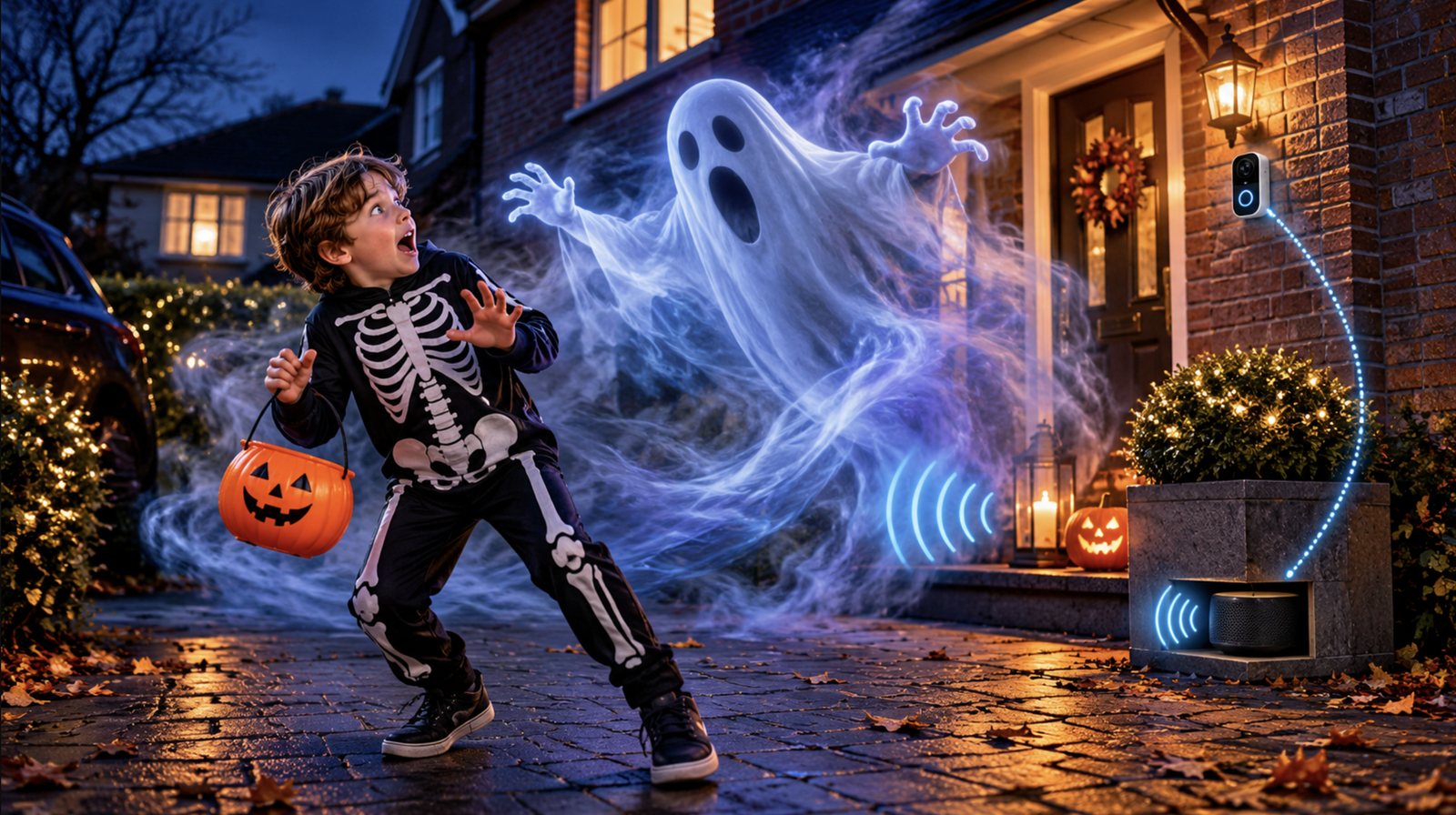
Halloween’s been and gone, but this year our driveway had a secret. Anyone who walked up to the door, from trick-or-treaters to the poor delivery driver, got a burst of ghosts, werewolves and creaking doors from a speaker they couldn’t see. It went down so well I’m writing it up now, while it’s fresh, so you can set it up once and have it ready for next year.
I’m also thinking the same can be used for Christmas greetings!!
Here’s how it fits together.
The kit
A Reolink video doorbell, which reports button presses to Home Assistant
Frigate, an open-source video recorder that runs object detection on the front camera, so this Home Assistant knows when a person is on the driveway
An Amazon Echo tucked away on the driveway as the speaker, controlled through the Alexa Media Player integration from HACS
And of course Home Assistant
How does it work?
The Triggers: The doorbell press or a (to be scared) person
Reolink integration has a entity sensor called “visitor”, we wait for this to change switching from off to on (someone pressed the button)
Frigate’s person sensor for the “front camera”, reports when someone, a person, is there
I tried raw camera motion first, and it was useless. Car headlights, rain, swaying hedges and passing cats all set it off. Frigate’s person detection only fires for actual people, so the scare happens when there’s someone there to scare , this is what I chose.
Sending Sounds, but not the same sound
Here we have a few issues to resolve
Where are the sounds?
We want to send “different” sounds, otherwise its kinda boring
We want to make the sounds of a decent length
I want it easy - kids = not a lot of time
Sounds without hosting any files
Getting custom audio onto an Echo usually means hosting MP3s at an HTTPS URL in exactly the right format. I want the easy life, so I skipped all of that with Amazon’s built-in soundbank!. This is a little gem, hundreds of sound effects that any Echo can play using a soundbank:// URL inside an SSML <audio> tag. You can get more information on the soundbank from this url https://developer.amazon.com/en-US/docs/alexa/custom-skills/ask-soundlibrary.html
I listened through the library and filtered out the ones which sounded like halloween ones. I ended up keeping 27 clips: horror stings, ghosts and demons, vampires, werewolves, giant monsters, and a couple of very squeaky doors - Perrrrfect to scare the person.
Two clips, no gap
In my first attempt , I found one clip was over too quickly, so I changed the scripts so that each scare plays two sound clips. If you send them as two separate messages, there’s an awkward pause between them. Putting both <audio> tags in one message makes them play straight after each other much better:
- action: notify.alexa_media
  data:
    target: media_player.clock
    message: >
      <audio src='soundbank://soundlibrary/{{ sound_1 }}'/>
      <audio src='soundbank://soundlibrary/{{ sound_2 }}'/>
    data:
      type: tts
Also using type: tts rather than announce appears to matter too. Announcements play a chime first, which warns the visitor before the scare - you dont want that, and warns them that they are about to be scared.
Not the same scare twice
Picking clips at random means the same one sometimes comes up twice in a row. Instead, the script reads the counter, plays clips n and n+1 from the list, then adds two to the counter:
variables:
  idx: "{{ states('counter.halloween_sound_index') | int(0) }}"
  sound_1: "{{ sounds[idx % (sounds | length)] }}"
  sound_2: "{{ sounds[(idx + 1) % (sounds | length)] }}"
There’s a nice side effect: the list has 27 clips, an odd number. Stepping through it two at a time, one lap ends with clip 27 paired with clip 1, which pushes the next lap along by one. Pass by pass, the pairings switch between two different sets, so each clip gets two different partners and regular visitors (looking at you, delivery drivers) don’t always hear the same combination.
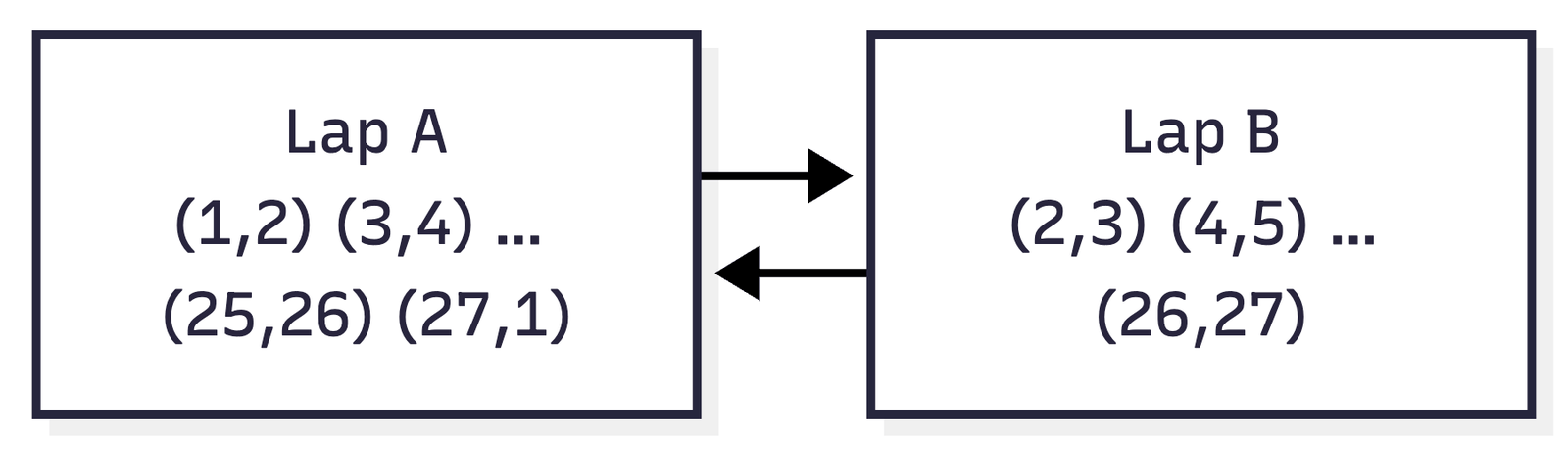
So the idea isnt , lets make things random but lets make it so the same two scares dont appear one after the other.
One visitor, one scare
A visitor usually sets off both triggers: Frigate sees them walk up, then a few seconds later they press the doorbell. Without some protection they’d get two scares on top of each other.
The fix is simple. The automation runs in single mode with max_exceeded: silent, and a 20-second delay at the end. While that delay is running, the automation is still busy, so new triggers are quietly ignored.
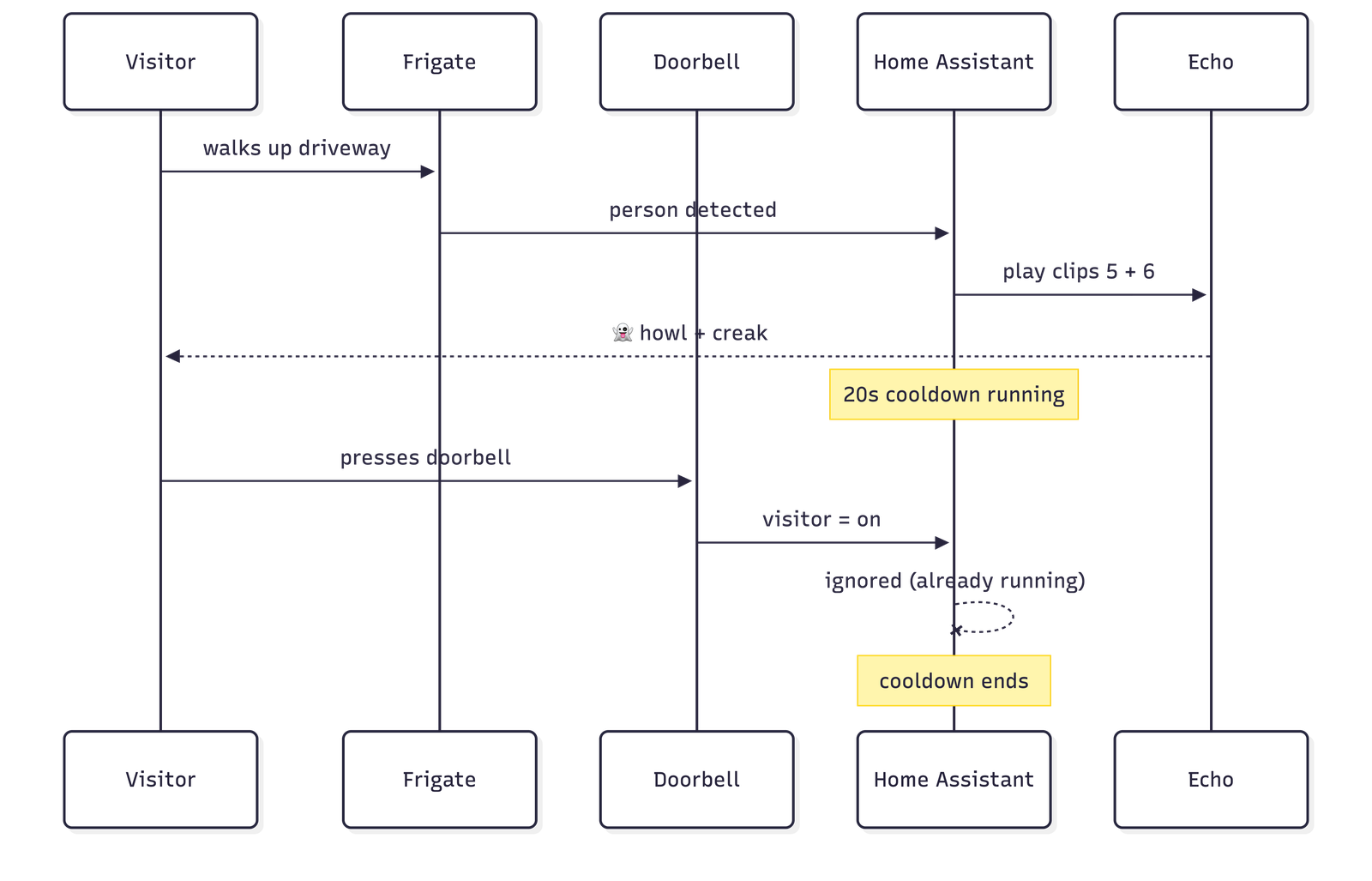
Two clips last about 6 to 12 seconds, so 20 seconds covers the playback plus a bit of time for the visitor to get their breath back.
Bonus: An anti-theft alert
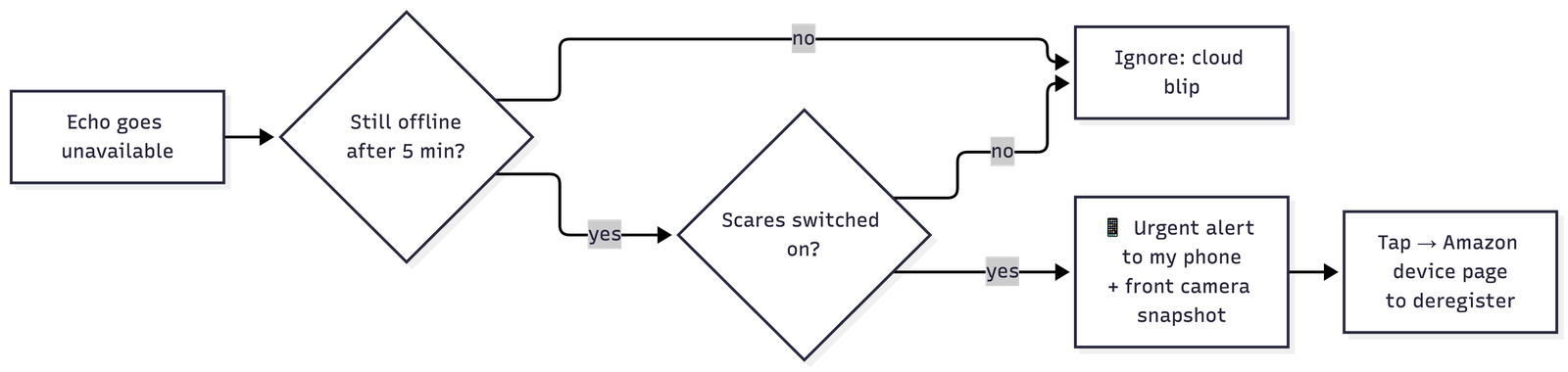
An Echo sitting on the driveway , even under a box like we had, is an easy thing to steal. A second automation keeps watch over it - if the Echo has been unavailable for five minutes while scares are on, my phone gets an urgent notification with a snapshot from the front camera. Tapping it opens Amazon’s device page so I can deregister the Echo straight away.
The five-minute wait matters. Alexa Media Player drops out briefly during Amazon cloud blips and Home Assistant restarts, and I don’t want a false alarm every time that happens.
Final Architecture
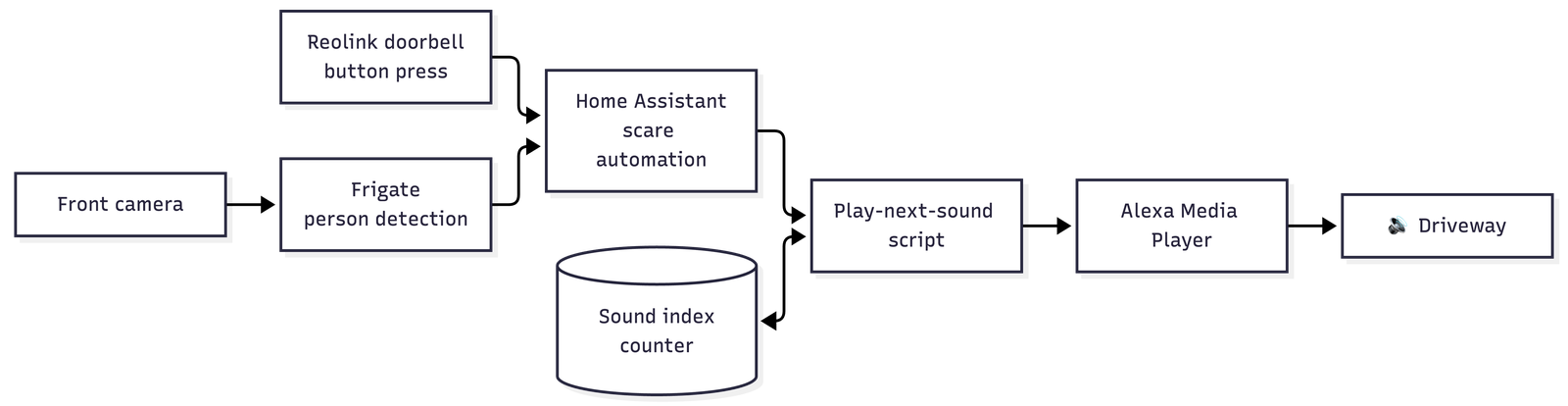
Lessons learned
Use person detection, not raw motion. Anything visitors will notice should only fire when there’s actually a person.
Group sounds into one message. One SSML message with several
<audio>tags plays them back-to-back with no gap and no chime.Cycle through the list instead of picking at random. A counter with an odd-length list gives you variety without repeats.
One visitor, one scare.
singlemode plus a trailing delay is the simplest cooldown there is.Plan for outdoor hardware going missing. A cheap alert can save you some hassle.
Wife telling me that this was an over engineered solution - but she loves it
Happy haunting! 🎃
Lets Implement it
If you want the scares, follow these instructions. To implement this you will need :
A Reolink video doorbell, which reports button presses to Home Assistant. You can use a different doorbell , you will need to change the entity which detects when the doorbell is rung
Frigate, an open-source video recorder that runs object detection on the front camera, so this Home Assistant knows when a person is on the driveway
An Amazon Echo tucked away on the driveway as the speaker, controlled through the Alexa Media Player integration from HACS
And of course Home Assistant
Step 1: Create the counter helper
Go to Settings → Devices & services → Helpers → Create helper → Counter and create:
NameEntity IDPurposeHalloween sound indexcounter.halloween_sound_indexRemembers your place in the playlist
Leave its settings at the defaults (start at 0, step 1, no maximum).
Step 2: Choose your sounds
Amazon’s Alexa Skills Kit Sound Library has hundreds of sound effects that any Echo can play. Browse the Horror, Monsters, Magic and Doors categories and note the path of each sound you like, for example horror/horror_04 or monsters/werewolves/werewolves_02.
Tip: pick an odd number of sounds. Because the script plays two at a time, an odd-length list means the pairings change on the next pass through the list.
Step 3: Create the play-next-sound script
Go to Settings → Automations & scenes → Scripts → Add script, open the ⋮ menu, choose Edit in YAML, and paste:
alias: "Halloween: play next sounds"
description: >
  Plays the next two soundbank clips on the Echo as one seamless clip,
  cycling through the list via counter.halloween_sound_index.
icon: mdi:ghost
mode: single
variables:
  sounds:
    - horror/horror_01
    - horror/horror_04
    - horror/horror_08
    - monsters/ghosts_demons/ghosts_demons_03
    - monsters/vampires/vampires_05
    - monsters/werewolves/werewolves_02
    - monsters/giant_monster/giant_monster_05
    - magic/amzn_sfx_ghost_spooky_02
    - doors/doors_squeaky/squeaky_12
  idx: "{{ states('counter.halloween_sound_index') | int(0) }}"
  sound_1: "{{ sounds[idx % (sounds | length)] }}"
  sound_2: "{{ sounds[(idx + 1) % (sounds | length)] }}"
sequence:
  - action: notify.alexa_media
    data:
      target:
        - media_player.driveway_echo
      message: >-
        <audio src='soundbank://soundlibrary/{{ sound_1 }}'/><audio
        src='soundbank://soundlibrary/{{ sound_2 }}'/>
      data:
        type: tts
  - action: counter.increment
    target:
      entity_id: counter.halloween_sound_index
  - action: counter.increment
    target:
      entity_id: counter.halloween_sound_index
Note : I’ve cut the example sound list in Step 3 to 9 clips to keep the guide short. It’s still an odd number, which the tip in Step 2 depends on. Feel free to add as many sounds as you like, at home I chose 27 sounds.
What it does:
Two
<audio>tags in one message play straight after each other with no gap. Sending them as two separate messages leaves an awkward pause.type: ttsplays the sounds without the announcement chime.announcewould warn the visitor first.The counter is increased twice to step past both sounds that just played. The
%(modulo) wraps the position back to the start of the list.
Test it: save the script and click Run. The Echo should play two sounds. Run it again and you should hear the next two.
Step 4: Create the scare automation
Go to Settings → Automations & scenes → Create automation → Create new automation, open ⋮ → Edit in YAML, and paste:
alias: "Halloween: scare visitors on driveway"
description: >
  Doorbell press or Frigate person detection plays the next two Halloween
  sounds on the Echo. Only runs 27 Oct – 1 Nov.
triggers:
  - trigger: state
    entity_id: binary_sensor.doorbell_visitor
    from: "off"
    to: "on"
  - trigger: state
    entity_id: binary_sensor.frontcam_person_occupancy
    from: "off"
    to: "on"
conditions:
  - alias: Between 27 Oct and 1 Nov
    condition: template
    value_template: >
      {% set md = (now().month, now().day) %}
      {{ (10, 27) <= md <= (11, 1) }}
actions:
  - action: script.halloween_play_next_sound
  - delay:
      seconds: 20
mode: single
max_exceeded: silent
What it does:
The date range. The condition turns today’s date into a
(month, day)pair and checks it falls between(10, 27)and(11, 1). Because the year isn’t part of the comparison, it works every year automatically: leave the automation enabled all year and it only fires during Halloween week. Change the two pairs to adjust the dates.Person detection instead of motion. Use Frigate’s
person_occupancysensor, not raw camera motion, which goes off for headlights, rain and shadows.The 20-second cooldown. The automation runs in
singlemode, and thedelayat the end keeps it busy for 20 seconds. If the same visitor then presses the doorbell, that trigger is ignored, so they get one scare rather than two.max_exceeded: silentstops those ignored triggers filling your log with warnings.Adjust the delay to your sounds. Two clips usually last 6 to 12 seconds, so 20 seconds leaves some margin.
If you only have a doorbell or only a camera, delete the trigger you don’t need.
Optional: limit it to the evening. If you want to avoid scaring the postman at 10am, add a time condition under conditions::
  - condition: time
    after: "16:00:00"
    before: "21:00:00"
If your date range crosses New Year (for example a Christmas version from 20 Dec to 2 Jan), a single comparison won’t work. Use or instead:
value_template: >
  {% set md = (now().month, now().day) %}
  {{ md >= (12, 20) or md <= (1, 2) }}
Step 5 (optional): Add a theft alert
An Echo left outside is easy to steal. This automation alerts your phone, with a camera snapshot, if the Echo stays offline for 5 minutes during Halloween week:
alias: "Halloween: driveway Echo offline alert"
triggers:
  - trigger: state
    entity_id: media_player.driveway_echo
    to: unavailable
    for:
      minutes: 5
conditions:
  - alias: Between 27 Oct and 1 Nov
    condition: template
    value_template: >
      {% set md = (now().month, now().day) %}
      {{ (10, 27) <= md <= (11, 1) }}
actions:
  - action: notify.mobile_app_my_phone
    data:
      title: "🎃 Driveway Echo offline"
      message: >
        The driveway Echo has been offline for 5 minutes. If it's been
        stolen, deregister it on Amazon (tap this notification).
      data:
        image: /api/camera_proxy/camera.frontcam
        url: https://www.amazon.co.uk/hz/mycd/digital-console/alldevices
        push:
          interruption-level: time-sensitive
mode: single
Notes:
Why 5 minutes: Alexa Media Player briefly shows the Echo as unavailable during Amazon cloud hiccups and Home Assistant restarts, and the wait avoids false alarms.
Your Amazon site: change the URL if your account isn’t on
amazon.co.uk. Useamazon.com,amazon.deand so on.iOS only:
interruption-level: time-sensitiveis an iOS setting. On Android, usepriority: highandttl: 0instead.
Step 6: Test it
The date condition blocks the automation outside Halloween week, so to test it early:
Test the sounds: run the script directly (Scripts → Halloween: play next sounds → Run). The script itself has no date check.
Test the triggers: temporarily widen the date range to include today, walk up the driveway or press the doorbell, and listen. Remember to change the dates back afterwards.
If nothing happens: open Settings → Automations → (your automation) → Traces. The trace shows which trigger fired and whether the date condition passed.
ENJOY!
Thank you, let me know if there are any issues
Footnote
This is my first blog post on substack , most of my others are on https://www.ateam-oracle.com/authors/angelo-santagata/ , Im keen to understand if people read this , find it useful so let me know!